AI is being forced upon us, but we can fight back and set up AI-free Google searches by default, allowing AI to be “opt-in”.
I know you’re probably tired of hearing about AI. I am too.
Whether you think it’s going to bring about civilization collapse (through AI taking everyone’s jobs), economic collapse (because of all the spending that will never have a return on investment), or whether you think it’s just a super cool tool you can use to answer every question you’ve ever had, you’re still probably hearing a bit too much about AI.
I’m kind of a moderate about AI. I like that chatbots like ChatGPT save context, as opposed to regular searches, which start from scratch with every search you make. It allows for larger, more ongoing tasks.
But I also believe that companies are being entirely reckless with their spending on data centers and the like, as none of that money will ever generate a return. (Read any of this guy’s posts if you are skeptical of this.) And all this spending might just take down the broader economy too. Hooray.
Then again, as the saying goes, the market can stay irrational longer than you can stay solvent. So I’m not willing to bet one way or the other on AI. I’ve seen how my predictions have gone in the past.
Forced to use AI in search
All this aside, one thing that I am very not happy about is how all of our tech is pushing AI on us whether we want it or not. And the place I see it most often is with search.
It used to be that a Google search would return the proverbial “ten blue links”, and you clicked the one that seemed to offer you the information you sought. But over the past few years, they’ve moved more and more away from this.
Today, the first thing you see in any Google search is an AI-generated answer. And I hate that.
I dislike how Google has scraped the internet and then put a (possibly-faulty) answer right in front of you, making you less likely to explore any other corner of the internet. As someone who has built a corner of the internet with over 1,000 posts, I take this personally. If Google scrapes my info, then people don’t visit my site, and my business doesn’t work anyone.
If you hate this AI-first search too, then I’ve got a solution for you that will turn it off by default, but allow you to opt-in to AI results when you want them.
Enter the time machine
Go do a Google search right now. Notice how the results page has a bunch of tabs at the top? The tabs say things like “Images”, “Maps”, “Videos”, etc. This is a way for you to filter your search results based on the type of content you want to see.
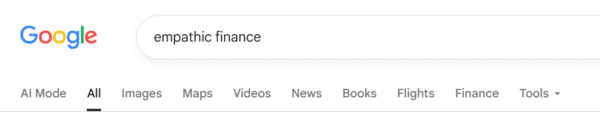
Front and center, though, is “AI Mode”. And even in the “All” tab, you get an AI-generated answer at the top, then some ads, and maybe some organic content at some point down the page.
But around the time that Google added this “AI Mode”, they also added a tab called “Web”.
If you have that Google search page still open, and if you see that “Web” tab, click it. This is, in effect, a time machine, a throwback to the way that Google used to be. You’ll see the ten blue links…and nothing more.
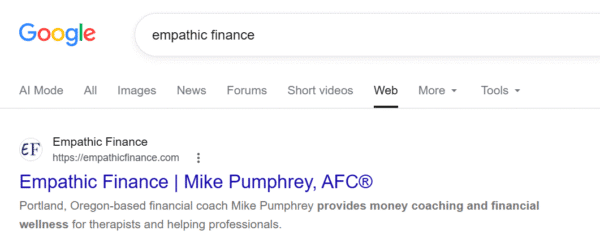
I love this view. It reminds me of a time when tech companies weren’t so ominously gleeful about bringing about the end of civilization, and tech CEOs weren’t so openly supporting authoritarianism. Remember that?
Not a default
But while I love that Google offered us this tantalizing throwback, it’s not particularly convenient, useful, or helpful to do a search, see all the AI junk, and then click over to the Web tab to see the search results. That’s “opt-out”, and I want “opt-in”. I want to be able to see AI-free results by default.
Luckily, there is a way to set this up on your browser.
The secret code
If you examine the URL when you clicked the “Web” tab, you’ll see that the URL was appended with the parameter &udm=14.
(Tech sidebar: The & means that what’s coming next is a parameter, not the parameter itself. URLs have a web address, which then can be followed by a ? and then a bunch of parameters separated by the & character. So this parameter sets the value of udm to be equal to 14. Any more than that, you don’t really need to know.)
If you take any Google search and manually add &udm=14 to the end of the URL, you’ll automatically get that AI-free result.
So this &udm=14 is basically the “secret code” that allows this all to happen.
And the best part is that we can set our browser’s search engine to automatically add this value to all of our searches!
Set up AI-free search in Chrome
I want to focus on Chrome, because it’s more likely than not what browser you’re using, but other browsers will likely work in the same way. (This should work similarly on mobile, but as I don’t use a smartphone, you’re on your own there.)
In your browser, go to Settings and select “Search engine”. You’ll see the “Default search engine”, which more likely than not is set to “Google”.
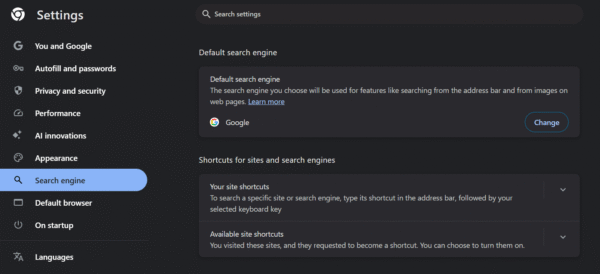
Click “Your site shortcuts” and then the “Add” button.
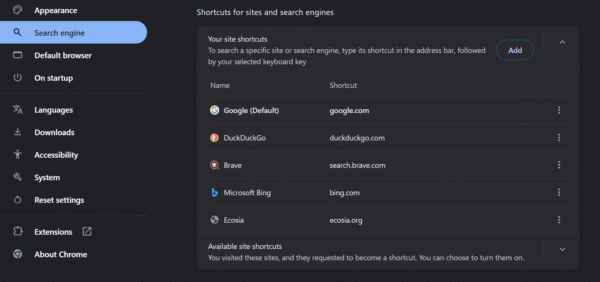
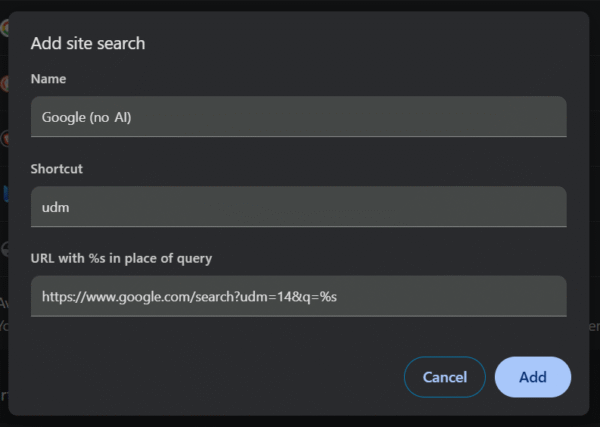
Fill out the form with the following information:
- Name:
Google (no AI) - Shortcut:
udm - URL with %s in place of query:
https://www.google.com/search?udm=14&q=%s
Then click “Add”.
Now you’ll see this new option in the list. Click the three vertical dots to the right of “Google (no AI)”. Select “Make default”.
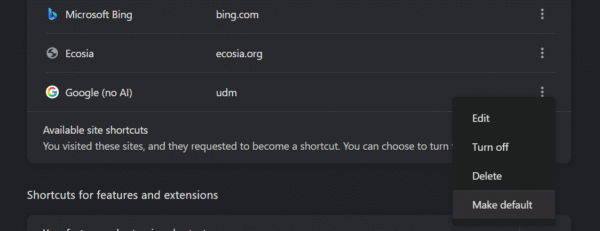
After that, you should see it listed as “(Default)”.
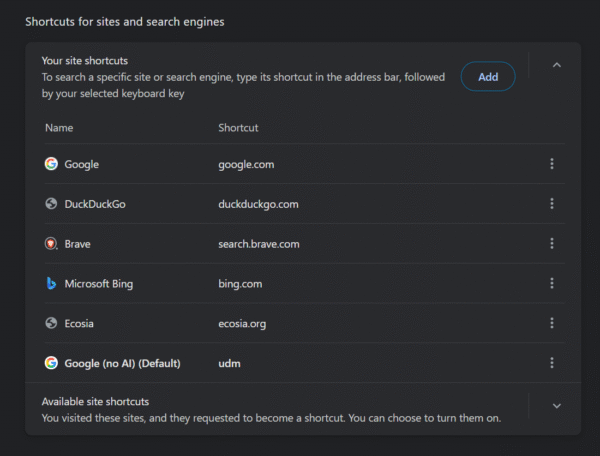
And now, when you use your browser to do a Google search, you will see a standard, old-school search by default. But if you want to redo the search with AI, you can just click the “All” tab or “AI Mode” tab.
Why this matters
I made a flippant post once about how AI can help you with financial wellness. (Click through to see what I mean.)
Yes, a post about customizing your Google search results isn’t as on-the-nose about money as, say, how to open a Roth IRA, or how to start building an emergency fund when money is tight.
But as AI is invading all of our technology, and our knowledge and awareness are inextricably linked with technology, we need to make sure that we’re not getting overloaded with the information that can’t always be relied on.
I’m not anti-AI. I actually used AI for help on this very post when I got stuck on something (Chrome had moved around some of its settings since I had set it up). But I had to choose to use AI, and that choice is something that I want to make sure we continue to have available to us.
Remember: Add &udm=14 to your searches to get rid of AI by default.